Groovyのすべてのクラスは暗黙的にgroovy.lang.GroovyObjectインタフェースを実装していて、GroovyObjectインタフェースにはMOP用のメソッドが定義されている。
こんな感じ。シンプル。
invokeMothod
set/getProperty
set/getMetaClass
→groovy.lang.MetaClass imprements MetaObject
コード例
まとめ
grooby++
かねこ\(^o^)/
2012年10月14日日曜日
2012年9月23日日曜日
Groovy!!(テスト!)
テスト書かない奴は死刑!
ということで、groovyのテストかいてみます。
コード みぢかっ!
テスト
実行
 グリーン。
グリーン。
今日のブログもう終わってしまった…つづく!
かねこ(-∧-;)
ということで、groovyのテストかいてみます。
コード みぢかっ!
テスト
実行

今日のブログもう終わってしまった…つづく!
かねこ(-∧-;)
2012年9月22日土曜日
Groovy!!(EclipseとGroovyプラグイン)
EclipseのGroovyプラグインいれるの巻。ほぼ全自動で楽々♪
ヘルプ→新規ソフトウェアのインストール


ヘルプ→新規ソフトウェアのインストール


何にも考えずにどんどん進んで、

インストール完了。
新規プロジェクトウィザードにGroovyできた。ナイス!
さっそくプロジェクト作ってみる。

check it!!

かねこ(´∀`∩)↑age↑
2012年9月20日木曜日
Groovy!!(Linuxに環境構築編)

Groovyきわめる!
まずはLinuxに環境構築する
前提確認。OS.
# uname -a
Linux polyrhythm.e2info.co.jp 2.6.32-220.el6.x86_64 #1 SMP Tue Dec 6 19:48:22 GMT 2011
x86_64 x86_64 x86_64 GNU/Linux
種類わかったから以下。
# cat /etc/redhat-release
CentOS release 6.2 (Final)
あとJava
java version "1.7.0_05-icedtea"
OpenJDK Runtime Environment (rhel-2.2.1.el6_3-x86_64)
OpenJDK 64-Bit Server VM (build 23.0-b21, mixed mode)
Groovyインストール!
バイナリ取得
[root@polyrhythm tmp]# cd /tmp
[root@polyrhythm tmp]# wget http://dist.groovy.codehaus.org/distributions/groovy-binar
展開と移動
[root@polyrhythm tmp]# unzip groovy-binary-2.0.2.zip
[root@polyrhythm tmp]# mv groovy-binary-2.0.2/ /usr/share/
シンボリックリンク(必須じゃない)
[root@polyrhythm share]# mv /usr/share/
[root@polyrhythm share]# ln -s /usr/share/groovy-2.0.2/ groovy
パス設定(本当は~/.bash_profileで。)
[root@polyrhythm share]# PATH=$PATH:/usr/share/groovy/bin/
[root@polyrhythm share]# export PATH
要チェック!
[root@polyrhythm share]# groovy -v
Groovy Version: 2.0.2 JVM: 1.6.0_24 Vendor: Sun Microsystems Inc. OS: Linux
やった。
コード実行
[root@polyrhythm e2info]# vi hw.groovy
println "Hello World!"

[root@polyrhythm e2info]# groovy hw.groovy
Hello World!
Groovyさいこう!
かねこ(^-^)
2012年9月18日火曜日
PHP Fog!
開発環境構築はそろそろネタ切れになってきてちょっと飽きちゃたから、たまには他のことやろう。
PHP Fogが気になったので、つかってみます。PHPのクラウドプラットフォーム!
1.登録~SSHキー設定
(省略)
アプリ登録で、とりあえずCustom Appを選択。登録が完了するとHelloWorldがでるようになる。

2.Gitリポジトリからソースコード取得
git cloneする。
3.ソースコード書き換え
適当に。
4.commit~push
コミットしてプッシュ。お決まり。
5.確認
さっきプッシュした内容が反映されたことを確認。

て感じでお手軽かどうかイマイチどうかわからない(コミットフックして自動デプロイってすぐ作れるもんね)PHP Fogだけど、スケールアウトしたりスケールアップしたり、リリースバージョン管理したり、すぐサービス起動したり止めたり、そういうクラウドの特徴っぽいところで真価を発揮するんだろうよ、きっと。
AppFogもきになる!
かねこ(b´∀`)
PHP Fogが気になったので、つかってみます。PHPのクラウドプラットフォーム!
1.登録~SSHキー設定
(省略)
アプリ登録で、とりあえずCustom Appを選択。登録が完了するとHelloWorldがでるようになる。

2.Gitリポジトリからソースコード取得
git cloneする。
# git clone git@git01.phpfog.com:e2kaneko.phpfogapp.com
Cloning into 'e2kaneko.phpfogapp.com'...
remote: Counting objects: 3, done.
remote: Total 3 (delta 0), reused 0 (delta 0)
Receiving objects: 100% (3/3), done.
3.ソースコード書き換え
適当に。
4.commit~push
コミットしてプッシュ。お決まり。
# git commit . -m "change message."
[master 3db2846] change message.
 1 file changed, 1 insertion(+), 1 deletion(-)

# git push
Counting objects: 5, done.
Writing objects: 100% (3/3), 271 bytes, done.
Total 3 (delta 0), reused 0 (delta 0)
remote:  -----> Deploying to the cloud
To git@git01.phpfog.com:e2kaneko.phpfogapp.com
   c0fb119..3db2846  master -> master
5.確認
さっきプッシュした内容が反映されたことを確認。

て感じでお手軽かどうかイマイチどうかわからない(コミットフックして自動デプロイってすぐ作れるもんね)PHP Fogだけど、スケールアウトしたりスケールアップしたり、リリースバージョン管理したり、すぐサービス起動したり止めたり、そういうクラウドの特徴っぽいところで真価を発揮するんだろうよ、きっと。
AppFogもきになる!
かねこ(b´∀`)
2012年9月17日月曜日
SVNとIRC連携の巻
SVNコミットをIRCに通知してみる。
ネット見たらSmartIRCのほうがよさそう。
かいた。
サーバに置いて、post-commit変更
どうかな

(*´・ω・)かねこ(・ω・`*)
SVNにはpost-commitがあるから、たぶん楽勝。
環境もなんでもいいんだろうけど、手っ取り早そうなPHPで。
pearライブラリ検索
> pear search IR
Retrieving data...0%.MATCHED PACKAGES, CHANNEL PEAR.PHP.NET:=======================================PACKAGE STABLE/(LATEST) LOCALNet_IRC 0.0.7 (beta) IRC Client ClassNet_SmartIRC 1.0.2 (stable) 1.0.2 Net_SmartIRC is a PHP class for communication with IRC networks
サーバに置いて、post-commit変更
[root@hoge hooks]# vi post-commit#!/bin/sAUTHOR=`svnlook author -r $REV $REPOS`LOG=`svnlook log -r $REV $REPOS`CHANGES=`svnlook changed -r $REV $REPOS`
php /home/e2info/developer/svn-irc.php "$AUTHOR" "$LOG" "$CHANGES"
どうかな

できた!!日本語よめないのはめんどくさいからまた今度で。
(*´・ω・)かねこ(・ω・`*)
2012年9月14日金曜日
Jenkins先生とIRCの連携の巻
IRCサーバうごいたので、早速Jenkinsのビルド結果をIRCサーバに送ってみよう。
JenkinsにはIRC Pluginがあるので導入。
Jenkinsの管理→プラグインの管理→Jenkins IRC Plugin

「Jenkinsの管理」→「システムの設定」にIRC Nortification発見!有効に。

ビルドしてみる…jenkins-botきた!わーい

いや、なんかしろ(笑)
気を取り直して設定見直し。
プロジェクト単位の設定の方にあった。


JenkinsにはIRC Pluginがあるので導入。
Jenkinsの管理→プラグインの管理→Jenkins IRC Plugin

「Jenkinsの管理」→「システムの設定」にIRC Nortification発見!有効に。

ビルドしてみる…jenkins-botきた!わーい

いや、なんかしろ(笑)
気を取り直して設定見直し。
プロジェクト単位の設定の方にあった。

再度ビルド。

できたー!連携サイコー!
IRC用のちっちゃいモニター欲しい。
かねこ( ^ω^ )
2012年9月13日木曜日
IRCいれた!!の巻
iRCサーバいれた。
設置と設定が簡単そうなので、IRCD-Hybridを選択。どのへんがハイブリッドなんだろうか。
EPEL追加
yumインストールして、
コンフィグファイル設定して起動
できた?
つないでみる

OS起動時に自動起動するようにして、
おしまい~☆
かねこ(・д・)
設置と設定が簡単そうなので、IRCD-Hybridを選択。どのへんがハイブリッドなんだろうか。
EPEL追加
[root@polyrhythm tmp]cd /tmp
[root@polyrhythm tmp]# wget http://syslogserver.googlecode.com/files/epel-release-5-3.noarch.rpm
--2012-09-12 18:19:48--  http://syslogserver.googlecode.com/files/epel-release-5-3.noarch.rpm
Resolving syslogserver.googlecode.com... 74.125.31.82, 2404:6800:4008:c00::52
Connecting to syslogserver.googlecode.com|74.125.31.82|:80... connected.
HTTP request sent, awaiting response... 200 OK
Length: 11989 (12K) [application/x-rpm]
Saving to:  epel-release-5-3.noarch.rpm”

100%[======================================>] 11,989      --.-K/s   in 0.03s

2012-09-12 18:19:48 (396 KB/s) -  epel-release-5-3.noarch.rpm  saved [11989/11989]

[root@polyrhythm tmp]# rpm -ivh epel-release-5-3.noarch.rpm
warning: epel-release-5-3.noarch.rpm: Header V3 DSA/SHA1 Signature, key ID 21752
1f6: NOKEY
Preparing...                ########################################### [100%]
   1:epel-release           ########################################### [100%]
yumインストールして、
[root@polyrhythm tmp]# yum --enablerepo=epel install ircd-hybrid
(略)

Installed:
  ircd-hybrid.x86_64 0:7.2.3-5.el5

Dependency Installed:
  openssl098e.x86_64 0:0.9.8e-17.el6.centos.2

Complete!
[root@polyrhythm tmp]#
コンフィグファイル設定して起動
[root@polyrhythm tmp]# cp /usr/share/doc/ircd-hybrid-7.2.3/simple.conf /etc/ircd/ircd.conf
[root@polyrhythm tmp]# vi /etc/ircd/ircd.conf

serverinfo {
        name = "polyrhythm.e2info.co.jp";
        sid = "000";
        description = "Test IRC Server";
        hub = no;
};

[root@polyrhythm tmp]# service ircd start
[root@polyrhythm tmp]# service ircd status
ircd (pid 13110) is running...
できた?
つないでみる

つながった?よくわからないけど、つながったんだろう、きっと。
OS起動時に自動起動するようにして、
[root@polyrhythm tmp]# chkconfig ircd on
おしまい~☆
かねこ(・д・)
2012年9月11日火曜日
最強の開発環境をつくるぞ!
本気でやるぞ!

というわけで、グランドデザインのラフつくりました。イマイチ!
トモチンに「もっとかっこよくしたい!」って相談したら、「モノクロにするとかっこよくなりますよ~」って言われたんだけど、モノクロのやりかたはおしえてくれませんでした
(-∧-;) あいつめ。
現在導入済みの環境は、
次はとりあえず全部つないじゃうのがわかりやすくていいだろうと思うので、iRCサーバ作って導入済みプロダクトの通知をバンバン飛ばしてみたい!
よって次回は、iRCサーバをたちあげてみたいと思います。
楽しみ!
かねこ(゜-゜)

トモチンに「もっとかっこよくしたい!」って相談したら、「モノクロにするとかっこよくなりますよ~」って言われたんだけど、モノクロのやりかたはおしえてくれませんでした
(-∧-;) あいつめ。
現在導入済みの環境は、
- Jenkins
- SVN
- Redmine
- Aipo
- サーバ死活監視
ほかにもあったっけな?
次はとりあえず全部つないじゃうのがわかりやすくていいだろうと思うので、iRCサーバ作って導入済みプロダクトの通知をバンバン飛ばしてみたい!
よって次回は、iRCサーバをたちあげてみたいと思います。
楽しみ!
かねこ(゜-゜)
2012年9月10日月曜日
Jenkins導入しました
ひろっちと開発チーム用サーバつくりました。KVM上にCentOS。
サーバ名はpolyrhythm.
かっこいい!
Jenkins入れました。

メモリ不足。
スペック貧弱すぎたか( TДT)

まだまだ序の口。
かねこ(゚з゚)
2012年3月22日木曜日
MongoDB(2) はろーわーるど
つづき。MongoDBをつかってみます。
mongoシェルログイン
testデータベース(?)にログインしたっぽい。
create tableどーやるんだ。
ヘルプで確認。
create table ない。
もういっこのヘルプ参照
みつからず。
mycollってのはコレクションのことっぽい。
ていうか、もしかして、
スキーマレスってそういうことかー。 すごい。
カオス!
おもしろい!
まとめ
MongoDBはFacebookのデータ構造に近い。
かねこ(*´σ`)
mongoシェルログイン
> mongo
MongoDB shell version: 2.0.3
connecting to: test
>
testデータベース(?)にログインしたっぽい。
create tableどーやるんだ。
ヘルプで確認。
> help db.help() help on db methods db.mycoll.help() help on collection methods rs.help() help on replica set methods help admin administrative help help connect connecting to a db help help keys key shortcuts help misc misc things to know help mr mapreduce show dbs show database names show collections show collections in current database show users show users in current database show profile show most recent system.profile .... show logs show the accessible logger names show log [name] prints out the last segment of log in .... useset current database db.foo.find() list objects in collection foo db.foo.find( { a : 1 } ) list objects in foo where a == 1 it result of the last line evaluated; use to further iterate DBQuery.shellBatchSize = x set default number of items to.... exit quit the mongo shell
create table ない。
もういっこのヘルプ参照
>db.mycoll.help()
DBCollection help
  db.mycoll.find().help() - show DBCursor help
  db.mycoll.count()
  db.mycoll.dataSize()
  db.mycoll.distinct( key ) - eg. db.mycoll.distinct( 'x' )
  db.mycoll.drop() drop the collection
  db.mycoll.dropIndex(name)
  db.mycoll.dropIndexes()
  db.mycoll.ensureIndex(keypattern[,options]) - options is an object withthese ....
  db.mycoll.reIndex()
  db.mycoll.find([query],[fields]) - query is an optional query filter. fields is op....
  db.mycoll.find(...).count()
  db.mycoll.find(...).limit(n)
  db.mycoll.find(...).skip(n)
  db.mycoll.find(...).sort(...)
  db.mycoll.findOne([query])
  db.mycoll.findAndModify( { update : ... , remove : bool [, query: {}, sort: {}, 'new': false] } )
  db.mycoll.getDB() get DB object associated with collection
  db.mycoll.getIndexes()
  db.mycoll.group( { key : ..., initial: ..., reduce : ...[, cond: ...] })
  db.mycoll.mapReduce( mapFunction , reduceFunction ,  )
  db.mycoll.remove(query)
  db.mycoll.renameCollection( newName ,  ) renames the collection.
  db.mycoll.runCommand( name ,  ) runs a db command with the gi....
  db.mycoll.save(obj)
  db.mycoll.stats()
  db.mycoll.storageSize() - includes free space allocated to this collection
  db.mycoll.totalIndexSize() - size in bytes of all the indexes
  db.mycoll.totalSize() - storage allocated for all data and indexes
  db.mycoll.update(query, object[, upsert_bool, multi_bool])
  db.mycoll.validate(  ) - SLOW
  db.mycoll.getShardVersion() - only for use with sharding
  db.mycoll.getShardDistribution() - prints statistics about data distribution in the cluster
みつからず。
mycollってのはコレクションのことっぽい。
ていうか、もしかして、
>db.example.save({name:'myname'})
>db.example.find();
{ "_id" : ObjectId("4f69656db3855bee2fdca9f2"), "name" : "myname" }
スキーマレスってそういうことかー。 すごい。
>db.example.save({age: 50})
>db.example.find()
{ "_id" : ObjectId("4f69656db3855bee2fdca9f2"), "name" : "myname" }
{ "_id" : ObjectId("4f696610b3855bee2fdca9f3"), "age" : 50 }
カオス!
> db.example.find({age: 50})
{ "_id" : ObjectId("4f696610b3855bee2fdca9f3"), "age" : 50 }
おもしろい!
まとめ
MongoDBはFacebookのデータ構造に近い。
かねこ(*´σ`)
2012年1月27日金曜日
vs Travis CI
CIサーバの用意めんどくさいから、オンラインのJenkinsあったらいいのになーと思っていたら、githubのリポジトリをそのまま使える、Travis CIというCIをみつけました。
とりあえずgithubのOAuthでログインして雰囲気をみて終了。
で、その後ちょっとだけコードかいたりしていたら、gmailにメールがいっぱい!!!

どうやらいつのまにか、自分のリポジトリをCI対象にしていたようだ。
ということで、せっかくなのでStill Failingを解決してずっと使えるようにしようと思います。
まず調査。
Rubyでテストしようとしてる(笑)
.travis.ymlをリポジトリルートにおいてPHPを指定しないといけないらしい。 ということで、追加。
.travis.yml
できた。
CakePHPの場合、通常はphpunitコマンドじゃなくてcakeコマンドでテスト実行するので、スクリプトを.travis.ymlに追加してみる。
.travis.yml
パーミッションあるのか。
.travis.yml
テスト用データベースに接続できなかった。
作る。
.travis.yml
そういえば、コンフィグファイルなかった。
.travis.yml
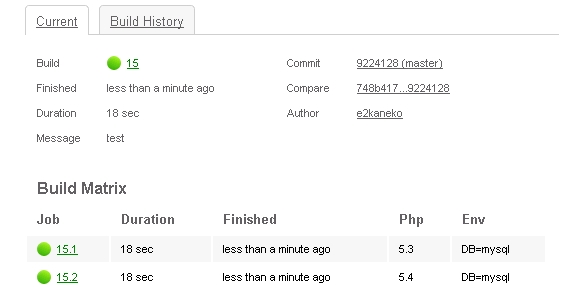
グリーン!!やったね!
SCMもCIもクラウドの時代ですよ、というわけで、おやすみなさい。
かねこ(^ν^)
とりあえずgithubのOAuthでログインして雰囲気をみて終了。
で、その後ちょっとだけコードかいたりしていたら、gmailにメールがいっぱい!!!

どうやらいつのまにか、自分のリポジトリをCI対象にしていたようだ。
ということで、せっかくなのでStill Failingを解決してずっと使えるようにしようと思います。
まず調査。
1Using worker: ruby2.worker.travis-ci.org:travis-ruby-63$ cd ~/builds4$ git clone --depth=100 --quiet git://github.com/e2kaneko/SocialLoginExamples.git e2kaneko/SocialLoginExamples5$ cd e2kaneko/SocialLoginExamples6$ git checkout -qf 4bea04f3da2290593d511804e3274821429835c17$ export TRAVIS_RUBY_VERSION=default8$ rvm use default9Using /home/vagrant/.rvm/gems/ruby-1.8.7-p35710$ ruby --version11ruby 1.8.7 (2011-12-28 patchlevel 357) [i686-linux]12$ gem --version131.8.1514$ rake15rake aborted!
Rubyでテストしようとしてる(笑)
.travis.ymlをリポジトリルートにおいてPHPを指定しないといけないらしい。 ということで、追加。
.travis.yml
language: php
php:
- 5.3
- 5.4
php:
- 5.3
- 5.4
Using worker: php1.worker.travis-ci.org:travis-php-13$ cd ~/builds4$ git clone --depth=100 --quiet git://github.com/e2kaneko/SocialLoginExamples.git e2kaneko/SocialLoginExamples5$ cd e2kaneko/SocialLoginExamples6$ git checkout -qf 479e254740fa4be905cfbc392eb640aa27044dfa7$ phpenv global 5.38$ php --version9PHP 5.3.9 (cli) (built: Jan 22 2012 13:00:07)10Copyright (c) 1997-2012 The PHP Group11Zend Engine v2.3.0, Copyright (c) 1998-2012 Zend Technologies12 with Xdebug v2.1.2, Copyright (c) 2002-2011, by Derick Rethans13$ phpunit14PHPUnit 3.6.8 by Sebastian Bergmann.16Usage: phpunit [switches] UnitTest [UnitTest.php]17 phpunit [switches] <directory>
できた。
CakePHPの場合、通常はphpunitコマンドじゃなくてcakeコマンドでテスト実行するので、スクリプトを.travis.ymlに追加してみる。
.travis.yml
language: php
php:
- 5.3
- 5.4
script:
- ./lib/Cake/Console/cake testsuite app AllTests --stderr
php:
- 5.3
- 5.4
script:
- ./lib/Cake/Console/cake testsuite app AllTests --stderr
19$ ./lib/Cake/Console/cake testsuite core AllTests --stderr20-bash: ./lib/Cake/Console/cake: Permission denied
パーミッションあるのか。
.travis.yml
language: php
php:
- 5.3
- 5.4
before_script:
- chmod -R 777 ./lib/Cake/Console/cake
script:
- ./lib/Cake/Console/cake testsuite app AllTests --stderr
php:
- 5.3
- 5.4
before_script:
- chmod -R 777 ./lib/Cake/Console/cake
script:
- ./lib/Cake/Console/cake testsuite app AllTests --stderr
19Welcome to CakePHP v2.0.4 Console20---------------------------------------------------------------21App : app22Path: /home/vagrant/builds/e2kaneko/SocialLoginExamples/app/23---------------------------------------------------------------24CakePHP Test Shell25---------------------------------------------------------------26Error: Database connection "SQLSTATE[42000] [1049] Unknown database 'test'" is missing, or could not be created.27#0
テスト用データベースに接続できなかった。
作る。
.travis.yml
language: php
php:
- 5.3
- 5.4
env:
- DB=mysql
before_script:
- sh -c "if [ '$DB' = 'mysql' ]; then mysql -e 'CREATE DATABASE test;'; fi"
- chmod -R 777 ./lib/Cake/Console/cake
script:
- ./lib/Cake/Console/cake testsuite app AllTests --stderr
php:
- 5.3
- 5.4
env:
- DB=mysql
before_script:
- sh -c "if [ '$DB' = 'mysql' ]; then mysql -e 'CREATE DATABASE test;'; fi"
- chmod -R 777 ./lib/Cake/Console/cake
script:
- ./lib/Cake/Console/cake testsuite app AllTests --stderr
13$ phpunit14PHP Notice: Undefined offset: 0 in /home/vagrant/.phpenv/versions/5.3.9/share/pyrus/.pear/php/PHPUnit/Util/Configuration.php on line 86015PHP Stack trace:
そういえば、コンフィグファイルなかった。
.travis.yml
language: php
php:
- 5.3
- 5.4
env:
- DB=mysql
before_script:
- sh -c "if [ '$DB' = 'mysql' ]; then mysql -e 'CREATE DATABASE test;'; fi"
- chmod -R 777 ./lib/Cake/Console/cake
- cp ./app/Config/const.php.default ./app/Config/const.php
script:
- ./lib/Cake/Console/cake testsuite app AllTests --stderr
php:
- 5.3
- 5.4
env:
- DB=mysql
before_script:
- sh -c "if [ '$DB' = 'mysql' ]; then mysql -e 'CREATE DATABASE test;'; fi"
- chmod -R 777 ./lib/Cake/Console/cake
- cp ./app/Config/const.php.default ./app/Config/const.php
script:
- ./lib/Cake/Console/cake testsuite app AllTests --stderr
グリーン!!やったね!
SCMもCIもクラウドの時代ですよ、というわけで、おやすみなさい。
かねこ(^ν^)
2011年12月18日日曜日
FacebookのCIのはなし
「Facebookには、テストサーバが存在しない。すべての開発者は本番サーバで直接開発・リリースしている。」という話があるようですが、少なくとも開発者ならこの話を文面通りに受け取る人はいないはずで、CIでバッチリ管理してるだろうということで、少し調べてみた。
まず、
テストちゃんとやってますよ、と。
まず、
- http://www.quora.com/What-kind-of-automated-testing-does-Facebook-do
- For our PHP code, we have a suite of a few thousand test classes using the PHPUnit framework. They range in complexity from simple true unit tests to large-scale integration tests that hit our production backend services. The PHPUnit tests are run both by developers as part of their workflow and continuously by an automated test runner on dedicated hardware. Our developer tools automatically use code coverage data to run tests that cover the outstanding edits in a developer sandbox, and a report of test results is automatically included in our code review tool when a patch is submitted for review.
- For browser-based testing of our Web code, we use the Watir framework. We have Watir tests covering a range of the site's functionality, particularly focused on privacy there are tons of "user X posts item Y and it should/shouldn't be visible to user Z" tests at the browser level. (Those privacy rules are, of course, also tested at a lower level, but the privacy implementation being rock-solid is a critical priority and warrants redundant test coverage.)
テストちゃんとやってますよ、と。
Watirてのは初めて聞いた。こんどドキュメント見てみよう。
そして、
- http://framethink.blogspot.com/2011/01/how-facebook-ships-code.html
- ops team runs code releases by gradually rolling code out
- facebook has around 60,000 servers
- there are 9 concentric levels for rolling out new code
- [CORRECTION thx epriest] "The nine push phases are not concentric. There are three concentric phases (p1 = internal release, p2 = small external release, p3 = full external release). The other six phases are auxiliary tiers like our internal tools, video upload hosts, etc."
- the smallest level is only 6 servers
- e.g., new tuesday release is rolled out to 6 servers (level 1), ops team then observes those 6 servers and make sure that they are behaving correctly before rolling forward to the next level.
- if a release is causing any issues (e.g., throwing errors, etc.) then push is halted. the engineer who committed the offending changeset is paged to fix the problem. and then the release starts over again at level 1.
- so a release may go thru levels repeatedly: 1-2-3-fix. back to 1. 1-2-3-4-5-fix. back to 1. 1-2-3-4-5-6-7-8-9.
サーバ多くなってくると、いろいろな工夫が必要になってくるね!
かねこ(・ε・)
2011年12月5日月曜日
おさらい(1)ソフトウェア内部アーキテクチャ
さて、勢いにのってガリガリとコードを書きたかったのですが、そんな時間はありませんでした。
なので、そういえば書きたかったシステムの設計について書いてみようと思います。
だいいちだん、ソフトウェア内部構造のまき。
ちなみにこれは、某Challenging Tomorrow's Changesな会社のSFAシステム構築プロジェクトに僕とまっちゃんコンビで参画したときに、お師匠のたなかみつるさんに教えてもらったアーキテクチャで、わずか数ヶ月の間にみにつけたこの設計技法は、その後何年間もずーっと、僕のシステム設計思想のベースになっているものです。ありがとう、お師匠。げんきか、まっちゃん。
というわけで、絵をかいてみました。

- N層アーキテクチャは導入必須。層を分離しないとテストコードが書けない。
- テストコード必須。テストコード書かないと、機能追加の際に一定ライン以上の品質を保証することができません。あと、漠然とした不安につきまとわれます。
- 基本的にMVCパターンの適用は必須で、要件と複雑さに応じて層を設計します。上の図は中間規模の業務システムを構築するときに設計のベースとしているMVC+Serviceでの設計。もう少し大規模になると、サービス層と永続化層の間にLogic層を挟むことを検討する。
- View層(プレゼンテーション層)にはテンプレートエンジンを導入。JavaだとVelocityとかFreeMarker、PHPはSmartyなど。PHP自体がテンプレートエンジンだけど、そのレベルでは保守性からみてダメで、ちゃんと処理・データとテンプレートが分離されている必要がある。
- Controller層では、View層(ブラウザ)からのリクエストを受け取って、ビジネスロジックに繋ぐ。Controllerにはビジネスロジックは記述しない。1画面(や、1機能)に対して1コントローラが存在する設計(P of EAAのPage Controllerパターン)と、システム内で一つのコントローラがすべてのリクエストをハンドリングする方法(P of EAAのFront Controllerパターン)があって、別にどっちでもいい。
- Service層(ロジック層)は、Session Facadeとして定義。トランザクションを意識した設計にする。
- 永続化層は、どの言語でもすぐれたフレームワークがたくさんあるので導入する。種類が色々あるので特性を理解して選定する。というか、実は選定はどれでもよくて、メンバーに特性を理解させることが重要。
- DaoとEntityにMockオブジェクトを定義するのは、Service層の自動テストを書くときにMockオブジェクトを利用したテストを実行するため。あとは、ビルドパラメータでmock/releaseの切り替えできるようにしておくことで、データベースに接続できない環境で画面を動かすことができる。
- また、某所では、サービス層のMockオブジェクトも定義するルールになっていて、プレゼンテーション層とロジック部分の開発の切り離しをしていた。これも上手くまわっていた。
- 上図にでてきていない部分としては、例外設計とログ設計重要。ちゃんとやる。あと、パターンの理解重要。同じ用語と概念でシステムについての会話ができるようになる。
そんなこんなで、なんでこんなことするかというと、すべては「テストを書きやすくするため」です。
TDDまでいかなくても、テストまで書くサイクルがきちんと回っているプロジェクトの場合、そうでないプロジェクトと比較すると品質がとてもよいです。経験上。
TDDまでいかなくても、テストまで書くサイクルがきちんと回っているプロジェクトの場合、そうでないプロジェクトと比較すると品質がとてもよいです。経験上。
で、テストをちゃんと書くするために、層を分離しましょうということになります。その結果、コンポーネントの独立性がたかくなって、保守もやりやすくなる。まさに、いいことずくめ。
自動テスト実行、自動ビルド、構成管理、カバレッジ、メトリクス、コード規約、コードの自動精査など、他にもまだまだおもしろそうな話題がいろいろありますよ。
というわけで、つづく。
やっぱりコード書けばよかった。
かねこ( ´_ゝ`)
やっぱりコード書けばよかった。
かねこ( ´_ゝ`)
登録:
投稿 (Atom)